Table of Contents
1. Introduction: Why Pricing Matters
Choosing the right version of QuickBooks isn’t just about features — price plays a huge role in determining which solution fits your firm or business. For accounting professionals, QuickBooks Desktop Accountant 2024 is a powerful desktop-based tool used by CPAs, bookkeepers, and accounting teams. But its pricing model has changed over time, prompting many to ask: What exactly does QuickBooks Desktop Accountant cost, and is it worth the price?
In this guide, we break down everything you need to know about QuickBooks Desktop Accountant 2024 pricing, what you get for your money, and how to make the smartest purchase decision for your budget.
2. What Is QuickBooks Desktop Accountant 2024?
QuickBooks Desktop Accountant 2024 is the professional desktop edition of QuickBooks designed for accounting experts. Unlike QuickBooks Pro or Premier, the Accountant edition includes specialized tools that help you manage multiple client books, perform batch updates, reclassify transactions quickly, and handle complex financial scenarios with ease.
This version runs locally on your Windows computer (offline), giving you full data control without relying on cloud storage. Traditionally, this has appealed to accountants and firms that prefer desktop reliability, advanced reporting, and robust client file management tools.
3. Official Annual Subscription Pricing (2026 Update)
For most users buying through Intuit directly, QuickBooks Desktop Accountant has moved to a subscription model — meaning you pay annually to maintain access, updates, and support.
Here’s the current official price structure for QuickBooks Desktop Accountant and related bundles (pricing effective February 1, 2026)
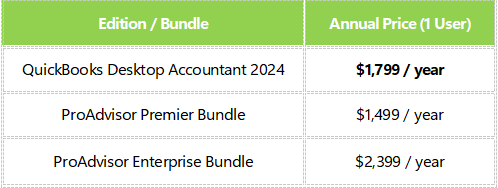
These subscription costs reflect the latest licensing changes by Intuit and are focused on keeping users on the most up-to-date version with support and updates included.
Key Takeaway
The pricing above applies to renewals or new subscriptions that enter service on or after February 1, 2026 — meaning this is the current real-world cost for accounting professionals looking to use Desktop Accountant into 2026 and beyond.
4. What’s Included in the Price
Paying for QuickBooks Desktop Accountant means you get:
Core Features
-
Full accounting suite for bookkeeping, reporting, invoices, and tax prep
-
Batch processing tools for making multiple changes at once
-
Direct integration with Excel and Word
-
Ability to toggle between Pro, Premier, Contractor, Nonprofit, and other modes
-
Streamlined client data review tools
-
Multi-user support when licensed appropriately
Additional Benefits with Subscription
-
Automatic yearly updates
-
Dedicated support from QuickBooks
-
Bug fixes and security updates
-
Continued access to the latest feature enhancements
These inclusions are valuable for accountants who rely on up-to-date tools and compliance features across tax years.
5. Comparing Pricing: Accountant vs Pro vs Premier
To put the Accountant edition pricing in perspective, let’s see how it compares with other popular desktop versions:
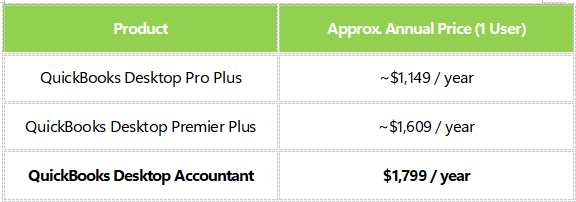
QuickBooks Desktop Accountant generally costs more than Pro and Premier because it’s specifically built for professionals handling multiple clients and more advanced financial tasks.
6. One-Time License Offers & Third-Party Deals
While the official Intuit pricing is subscription-based, third-party sellers still promote one-time license deals for QuickBooks Desktop Accountant 2024. These are usually unofficial reseller offers that may or may not include ongoing updates or support.
Examples of such offers include:
Lifetime license options advertised as low as around $115 – $799 depending on user count and reseller promotions.
Be Careful With Third-Party Deals
-
Prices vary widely between resellers
-
Some deals may not include official Intuit support or future updates
-
Always verify authenticity before purchase
-
Some prices might represent “promo” or outdated offers
If you choose a third-party option, understand you may be forfeiting official support and software updates that come with Intuit’s subscription model.
7. Factors That Affect Pricing
Understanding what drives QuickBooks Desktop Accountant pricing can help you plan your budget:
1. User Count
More users usually means higher total cost, especially if adding seats for a team.
2. Renewal vs New Subscription
Intuit’s current model bases pricing on renewal dates. Prices can vary depending on when you start or renew your subscription.
3. Add-Ons
Payroll services, advanced inventory tools, or hosted solutions can increase your total expenses.
4. Region & Reseller
Pricing may differ regionally or based on reseller deals (especially for older versions or lifetime licenses).
8. Tips for Choosing the Best Option
Here are practical tips to guide your purchase:
Evaluate Your Workload
Do you manage multiple clients? QuickBooks Desktop Accountant’s batch tools may be worth the higher subscription.
Check Renewal Timing
If you already have a subscription, consider renewing before price increases take effect.
Compare Subscription vs One-Time
Think long-term. A subscription includes updates; a lifetime license may save money upfront but offer no future updates.
Estimate Add-Ons
Factor in payroll, more users, or hosted access if your firm relies on those features.
9. Pros & Cons of Subscription vs One-Time
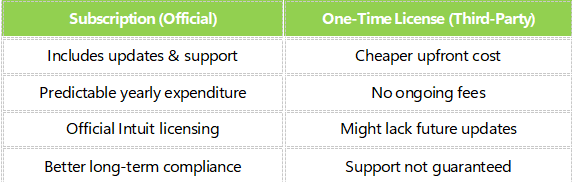
Subscription is usually better for professional firms requiring continued updates, while one-time licenses might appeal to small practices or occasional users.
10. Conclusion: What You Should Know
QuickBooks Desktop Accountant 2024 remains a top choice for accounting professionals who need powerful desktop accounting tools and advanced client management features. Its pricing has shifted toward an annual subscription model, with the latest official costs around $1,799 per year for a single user as of February 2026.
While third-party lifetime licenses exist, they come with trade-offs in support and updates. What matters most is understanding your firm’s needs — whether long-term support and compliance justify the subscription or a one-time license meets your current budget.